
Stage 5 of 7 · Go-live
Go-live: your AI team starts answering customers
We plan the cutover with your team a week ahead, then switch on in phases: a small pool of existing customers first, then wider as the results hold. Your team stays in the loop, and the off switch is always ready.
What this stage is
Cutover is the move from "your team answers every chat" to "the AI answers first and hands over what needs a person". We plan it a week ahead, with a checklist for each side.
Launch day is always a Monday or Tuesday, never the day before a weekend or public holiday. Both teams get two full working days to catch anything.
Go-live does not mean the AI answers everyone on day one. It starts with a small pool and widens in phases. Handing every conversation to the AI is not always the right goal, and some chats can stay with your team for good.
See it in action
Example chats and screens from this stage. Chats are illustrative, for a fictional business.
Launch morning
Day 0 starts with a small pool of existing customers.
Your team can take any chat back
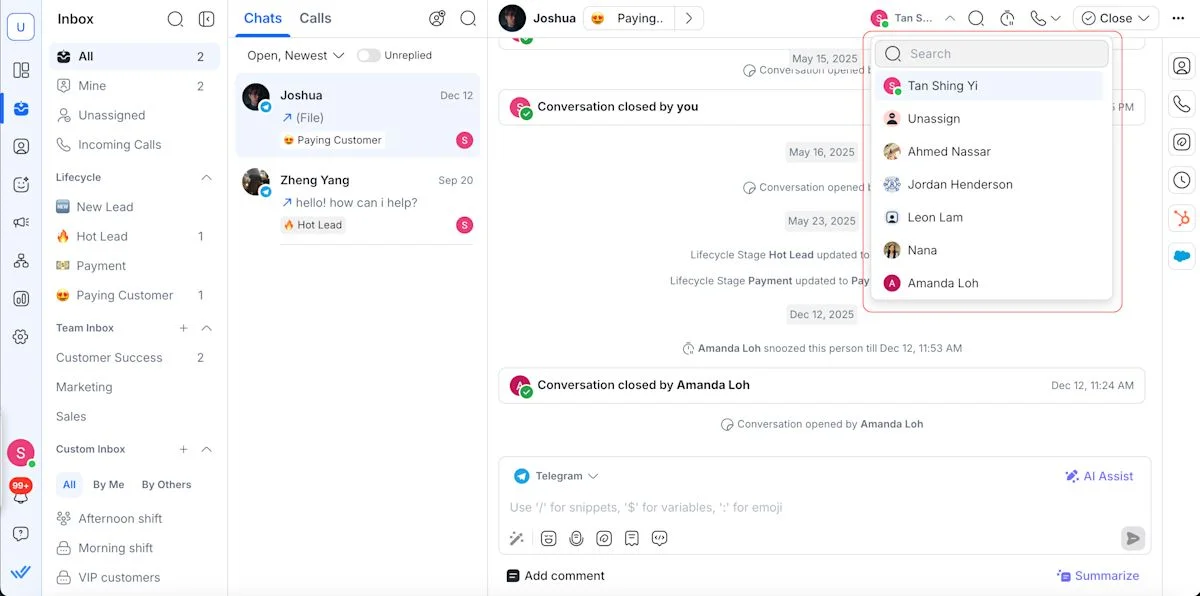
Assign the chat to yourself and reply. The AI steps back.
Close the chat when you are done
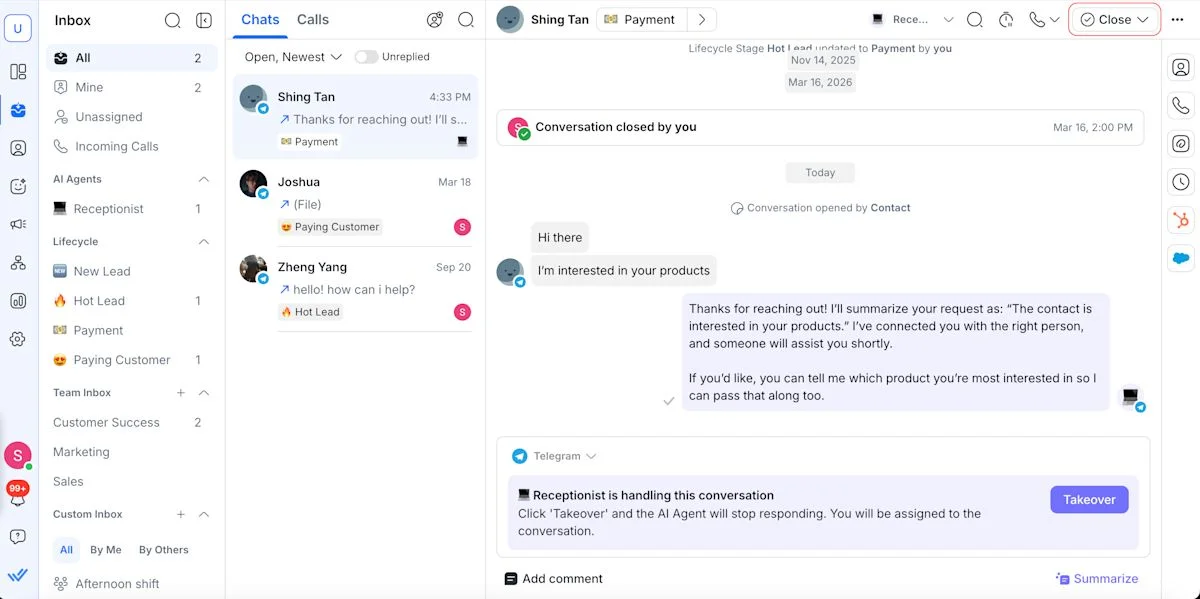
Closing a finished chat keeps follow-ups and reports accurate.
Launch in phases, not all at once
Start small, learn fast, then widen. Launching to everyone on day one leaves no room to correct course.
- Phase 1Launch day: a small, known poolThe AI answers only a group you choose: existing clients, existing customers or existing patients. They know you and will tell you if something is off. Your team answers everyone else as normal.
- Phase 2Widen step by stepMore of your contacts, another branch, longer hours or more types of chat. We widen only when the phase before holds, and only with your agreement.
- Phase 3The scope we agreedNew enquiries join. The full scope is agreed with you and does not have to be every chat: complaints, sensitive or high-value cases can stay with your team by design.
What we do in those hours
- We watch every conversation as it happens.
- We correct answers and knowledge the same day.
- We pause the AI at once if something needs it.
What we ask of you
- Keep your hand-over owner on hand.
- Flag anything odd straight to the project group.
- Tell us if a reply does not sound like you.
The cutover, day by day
Planned a week ahead, so launch day holds no surprises.
- T-7One week before
- Change freeze: from here we make fixes only, no new features.
- Agree the hand-over rota: who picks up chats the AI passes on, and when.
- Confirm every WhatsApp template is approved.
- List the manual broadcasts and workflows that stop, and who stops them.
- T-1The day before
- Brief your team, 30 minutes. We can run it.
- Final check of prices, promotions and opening hours.
- Stop the manual tasks the AI now handles, so customers do not get two messages.
- Shadow run: the AI drafts replies silently beside your team, and we compare them before it answers anyone.
- Day 0Launch, Monday or Tuesday
- The AI answers a small pool you chose: existing clients, customers or patients, often for set hours.
- We watch the first 3 hours live. Expect corrections: that is what this phase is for.
- Your team answers everyone outside the pool as normal.
- Your team works hand-overs as they arrive.
- Days 1-3Ramp-up
- A short daily check-in with you.
- The AI's share grows in phases as results hold, up to the scope we agreed.
- ThenHypercare begins
- 30 days of close review. What hypercare means.
Your cutover checklist
Tick these off with us in the week before launch. Each one removes a reason launch day could go wrong.
Ticks are saved in this browser only, so you can work through the list over several days.
What changes for your team
Plan for these now and the first week runs smoothly.
Customer-service staff
Fewer chats, but the harder ones. The AI handles routine questions and bookings, and your team gets the chats that need a person: photos, medical or account questions, complaints. Each arrives with the full conversation, so nobody starts from scratch.
Hand-over speed matters more
A handed-over customer is waiting for a person. Agree a reply target with us, and we report against it every week.
Managers
New numbers to watch: chats the AI resolves, hand-overs, bookings made and reply times. They come in your Monday update.
Workload and roles
Chats per person drop. Plan any staffing change on 2 to 4 weeks of hypercare data, not on launch day.
Stop doing
Manual reminders and follow-up broadcasts that the AI or a workflow now sends. Doing both means customers get two messages.
How the AI hands chats to your team
Clear rules decide when a person takes over, and the customer never feels the switch.
When the AI hands over
- The customer sends a photo.
- A medical, account or payment question the AI's knowledge does not answer.
- A complaint, a problem or a refund request.
- The customer asks for a person.
- An action fails twice, such as a booking that will not save.
- What the customer sees
A short holding line, such as "Let me check on this for you". The AI never mentions a transfer. - Where the chat lands
Assigned to your hand-over team, with the whole conversation and its tags. - What your team does
Reads the history, replies, and closes the chat when done. - Out of hours
The agreed message goes out, and your team picks up when the shift starts.
Illustrative example. The customer sees one smooth conversation; your team sees everything that came before.
The off switch
What we do
- Confirm every WhatsApp template is approved by Meta before launch day.
- Test the off switch before the first real chat.
- Send your team a briefing pack and run the briefing if you would like us to.
- Watch the first 3 hours live with you, and correct answers the same day.
- Review every AI conversation in the first days, and check in with you daily.
- Widen in phases only as the results hold, and only with your agreement.
How you know it is done
Go-live is done when the AI covers the scope we agreed, which may not be every chat, and we agree with you that the results are holding.
What you will hear from us
- Launch morning
A message when the AI goes on. - Days 1 to 3
A short daily check-in. - When the stage moves
Hypercare starts, with your first weekly report date.
Common questions
Can my team still reply to customers?
Yes, at any time. Anyone can open a chat and take over, and the AI steps back.
Does the AI have to answer all our customers from day one?
No. It starts with a small pool you choose, such as existing clients, customers or patients, and widens in phases as the results hold. Your team answers everyone else as normal.
Why start with existing customers?
They know you, they forgive a slip, and they tell you when something is off. Corrections happen with them before new enquiries ever see the AI.
What if the AI gets something wrong on day one?
Expect a few corrections, especially in the first 3 hours. We watch those hours live and fix answers the same day. After that we review every conversation in the first days, fixes go in within 48 hours, weekends included, and we tell you what changed.
Why not launch on a Friday?
A Friday launch leaves a weekend of chats with fewer people watching. Monday or Tuesday gives two full working days.
Do we need a new WhatsApp number?
No. The AI works on your existing number and inbox.
Do we need to tell our customers?
No announcement is needed. Your number, chat history and team stay the same, and the AI says it is an AI if a customer asks.
What happens on weekends and public holidays?
The AI answers around the clock. Chats that need a person wait for your team's next shift, with the out-of-hours message you agreed.
Questions about your stage?
Message us in your project WhatsApp group, or start a chat here. Your account owner replies.