


Welcome back
Here is everything in one place.
At a glance
Welcome note
How the first weeks with us work, what we need from your side (a point person, past conversations, your team briefed) and what you can count on from ours.


Your project
The AI team you specced, its build status, and what is due.


Tickets
Every ticket our team is tracking for your account, updated from our internal board. Items marked "Waiting on you" need a reply from your side. Need something done? Raise a new ticket and it lands straight on our board.


Monthly plans
Optional monthly plans that keep your AI team improving. Month-to-month, cancel with 30 days notice; the first month is due when you enable a plan.


Services
The systems we build and run for clients, offered as modules. Add one or combine several; each is scoped to your business before we quote.


Agreements
Your signed documents with Zelix Labs.


Billing & invoices
Your payment history and receipts.


Support
We are here to help. The fastest way to reach us is below.
Talk to the team
Raise a ticket and it lands straight on our team's board. Describe what you need, attach files if it helps, and follow progress from your Tickets page.
We typically reply within one working day.
Quick answers


Guides & training
Short walkthroughs for your team, in the order you will need them. Every guide is open to anyone in your company, no login needed.


New updates
What changed on your dashboard and how to use it, newest first. Bigger updates come with a short video.


Credentials
Share API keys and logins with our team securely. Each one is encrypted, can be opened only by named Zelix staff, and every access is logged here.
How we keep your credentials safe 1:53
A short guide for anyone on your account: what counts as a credential, how to share one here, and what protects it once it is with us. Narrated, with the key points on screen too.
Team
Give your colleagues their own logins. Everyone shares one Tickets board; billing, invoices and agreements stay visible to the account owner only.
Activity
Sign-ins, security changes and everything else that happens on your account.
Profile
Your details and your company's. We use them to fill in every agreement for you, so you only type them once.


Settings
Manage your account.


respond.io organisation
Send us your respond.io Organisation ID so we can be registered as the partner managing your account. We pass your details to our respond.io representative, who links your organisation to us. That is what gives us account-level support while we build and maintain your AI team.
We have passed these details to our respond.io representative. Nothing else is needed from you. Most accounts only have one organisation. Add another only if your company runs a second respond.io organisation.
- Open respond.io and click the settings gear in the left sidebar.
- Your Organisation ID is the number in brackets under Organization settings.
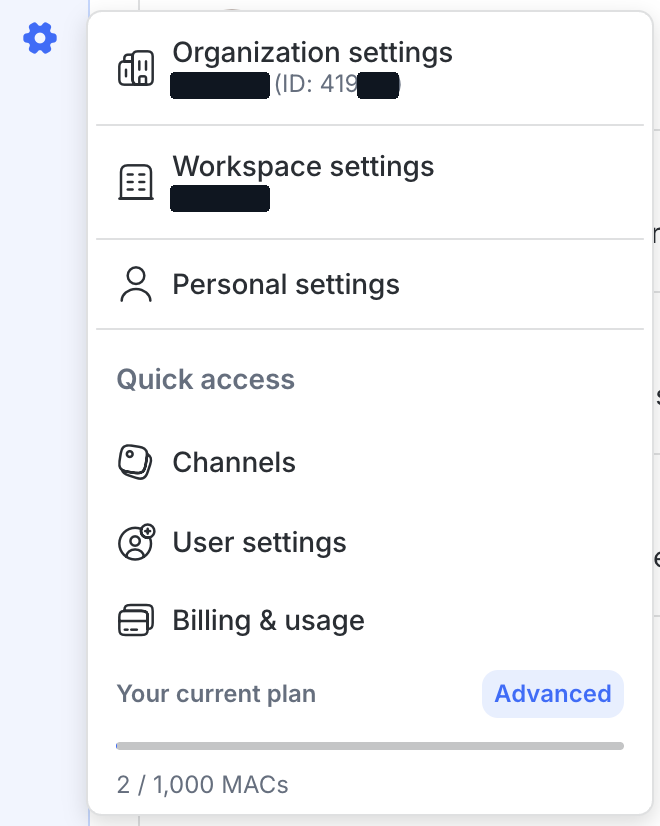
The workspace name and the last digits are hidden in this example. Yours will show in full.


Account
To change your name or company details, email us and we will update them.


Updates
How often we send a summary of what is happening on your tickets, and where it goes. Everyone with a dashboard login can have their own schedule.
Loading your update settings...


Appearance
Saved on this device. System follows your device setting.


Passkeys
Sign in with Face ID, Touch ID, Windows Hello or your device PIN instead of a password. A passkey cannot be phished or reused on another site, and it also counts as your two-factor step.
Checking your passkeys...
Security
Checking 2FA status...